Concepts
The building blocks of Engera: projects, items and revisions, lifecycle states, provenance, views, analysts and navigation.
Projects
Everything in Engera happens inside a project, typically one per programme, contract or bid. A project holds the documents you upload and the items built from them. Access is granted per project: a member sees a project only if they are on it.
Items & revisions
The unit of knowledge in Engera is the item. A requirement is an item. So is a risk, an obligation, a deliverable, a system element, a document section, a milestone. Every item has:
- a human ID (REQ-204, RISK-12, DOC-001) that stays stable and can be referenced in conversations, links and exports;
- revisions: an edit creates a new revision instead of overwriting the old one, so the item's history is always available;
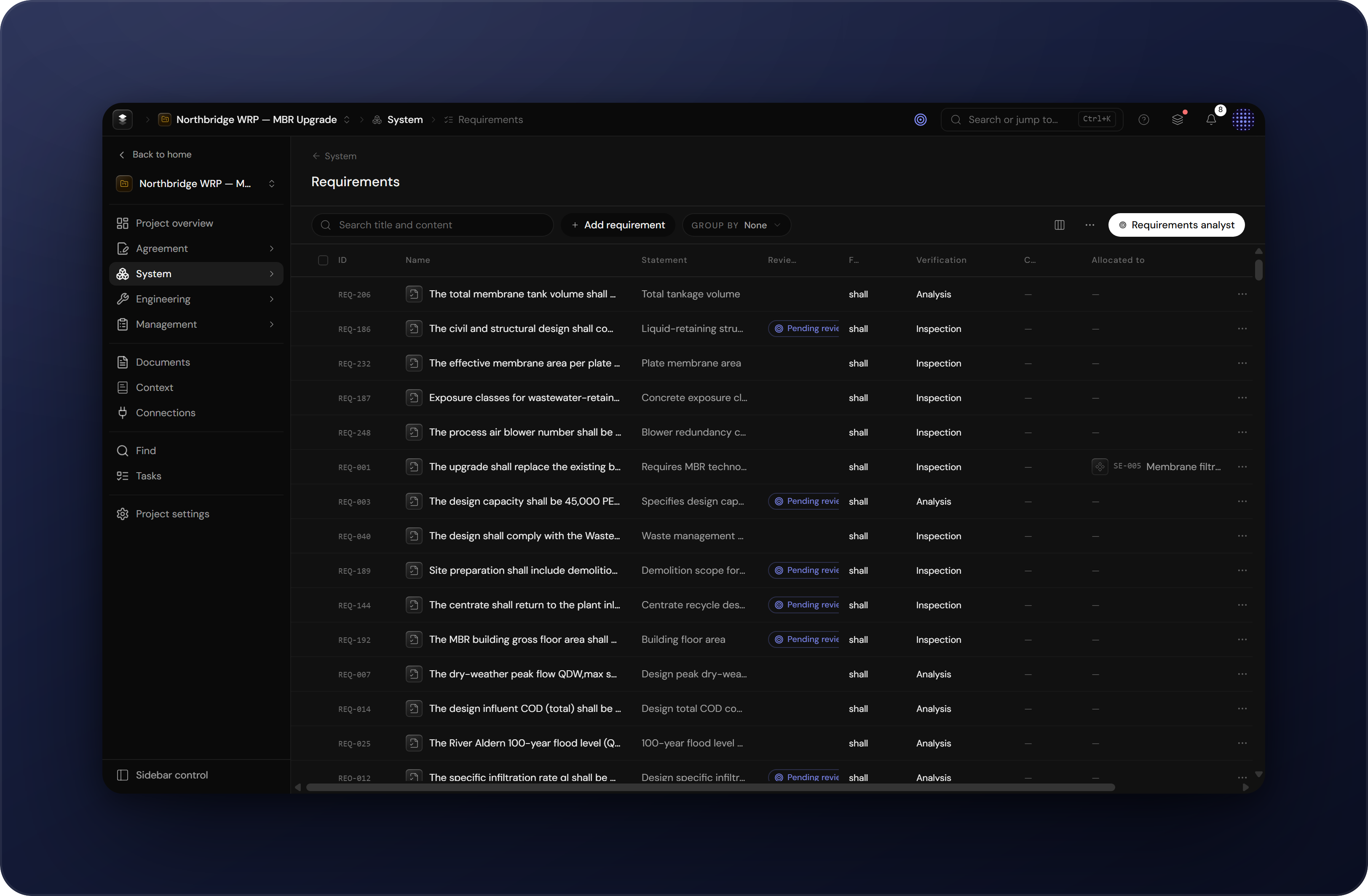
- typed fields for its kind. A requirement carries a statement, verification method and quality assessment. A risk carries likelihood and consequence.
Lifecycle & workflow states
Items move through a lifecycle. A knowledge item (a requirement, a system element) starts as a draft, which can be edited freely. Releasing it sets the state to released and locks its content and structural links. To change a released item, you raise an engineering change (EC-1, EC-2, …) that records what is being changed and why; the item is editable again while under change and locks on the next release.
Provenance & review
Every item records where it came from. An item is either authored by a person, extracted from a document, or proposed by an analyst. AI-created items enter the model as suggestions: visibly marked and kept apart from confirmed knowledge until someone accepts or dismisses them. Every AI result stores the reasoning behind it, and every change to an item lands in its history. The result is an audit trail: for any item you can see who or what created it, why, and how it has changed since.
Links & traceability
Items connect through typed links. A requirement derives from a contract clause. A risk threatens a system element. A requirement is allocated to the element that satisfies it. Links make the model traceable: from any item you can walk to its source and to everything that depends on it. When an analyst cites §4.2.1, the citation resolves to the same section item everywhere in the product.
Tables & detail views
Items appear in two places. The table view is the overview of a surface: sortable and filterable columns, grouping, and column settings that are saved per user. Clicking a row opens the detail view, a side panel with the item's fields, links, evidence and history. Every item also has a full-screen page of its own, reachable from the detail panel or by following any reference to its ID.
Analysts
Analysts are the conversational side of Engera. The global analyst on the project overview works across the whole project: it searches documents and items, reads the relevant passages, and answers with citations that link to the source. Each item surface also has a specialist analyst (documents, requirements, obligations, risks, schedule, product breakdown) that knows its surface and can act on it: propose items, link them, or run a derivation. Whatever an analyst proposes follows the same review rules as any other suggestion.
Bulk actions
Tables support working on many items at once. Selecting rows with the checkboxes brings up the bulk action bar: accept, dismiss, change state or delete the whole selection. Reviewing a derivation run that produced eighty proposals does not require eighty clicks.
Navigation
The project sidebar separates inputs from the model built on top of them:
- Inputs: Documents (the source files and their extracted structure), Context (background knowledge for the analysts) and Connections (links to external systems such as SharePoint and Jira).
- Project overview: the dashboard. Programme health, activity and open work in one place.
- Agreement answers what did we sign up to?: clauses, obligations and deliverables.
- System answers what are we building?: the product breakdown, requirements and standards.
- Engineering answers how is it engineered and verified?: engineering processes and their outputs.
- Management answers how do we run it?: work breakdown, changes, baselines, schedule and risks.
Humans & AI
The division of labour is the same everywhere in Engera. AI does the volume work: reading documents, extracting structure, deriving items, drafting answers with citations. People make the decisions. Three rules make that workable at programme scale:
- Nothing enters the model unreviewed. AI output arrives as suggestions and waits for a person to accept it.
- Every AI step is recorded. The reasoning, the source passages and the result are stored with the item, so a reviewer can check why something was proposed, not just what.
- The source stays one click away. Citations and derived items link to the exact clause they came from.